

We’re thrilled to introduce the Salesforce Spring ’25 release, packed with exciting new features, enhancements, and improvements to elevate your Salesforce experience. This release is designed to help you maximize productivity and make the most of Salesforce’s powerful capabilities. In this article, you’ll find a detailed breakdown of the latest features, key updates, and essential considerations to ensure a smooth transition. Our aim is to equip you with everything you need to fully leverage these new advancements and seamlessly adopt the latest version.
Key Highlights of the Spring ’25 Release:
- Introduction of new Agentforce capabilities
- Enhancements Salesforce Flow
- Greater visibility into how permissions are granted
- Performance and integration updates to Salesforce Products
We encourage you to thoroughly review these highlights and the release notes and explore the new features to see how they can benefit the team and clients. Salesforce Spring ’25 Release Notes
Release Timeline + Key Dates
The Salesforce Spring ’25 release will be rolled out according to the following schedule:
- Pre-release Preview: Available from December 19, 2024
- Sandbox Preview: Starts rolling out on January 3, 2025
- Production Release: Phased rollout from January 10 to February 14, 2024
Key Dates:
- December 19, 2024: Pre-release org available for testing
- January 3, 2025: Sandbox preview begins
- January 10, 2025: Start of production org rollouts
- February 14, 2024: All instances updated to Spring ’25
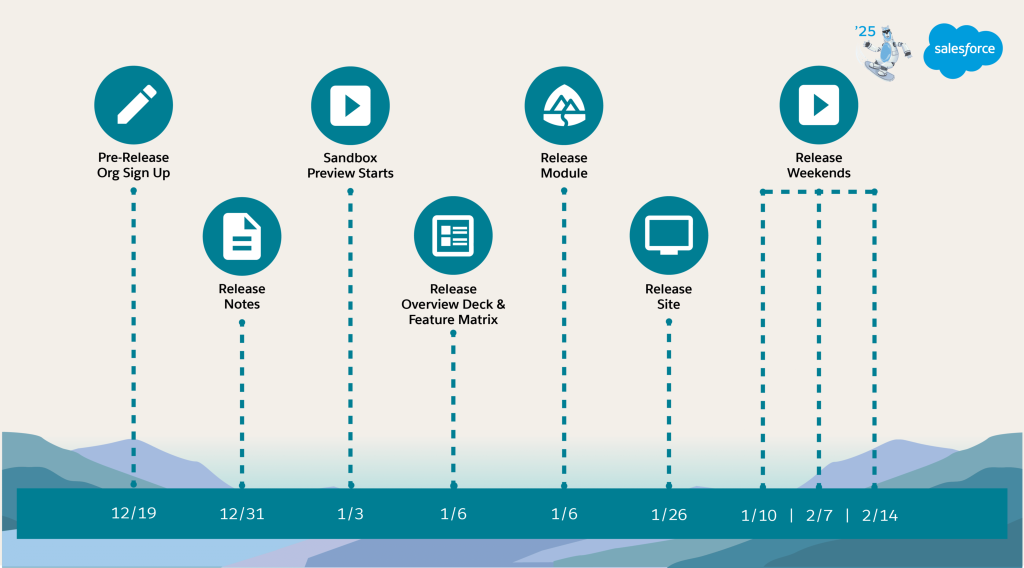
Important: Approximately 3-4 weeks before the start of the release window, specific release dates for individual instances will be available. Clients should check their Salesforce Trust page for the exact dates applicable to their instances.
Action Items:
- Review release notes and plan for new feature adoption
- Test critical functionality in sandbox environments
- Prepare end-users for any significant changes
- Schedule any necessary downtime or maintenance around your specific release date
For more detailed information on the release schedule, please visit:
Admin Release Countdown: Get Ready for Spring ’25 – Salesforce Admins
AI/Agentforce
Agentforce General Updates
Agentforce Multilingual Support Expansion
Overview: Salesforce is enhancing Agentforce with expanded language support, allowing users to interact with AI agents in multiple languages across various Salesforce platforms.
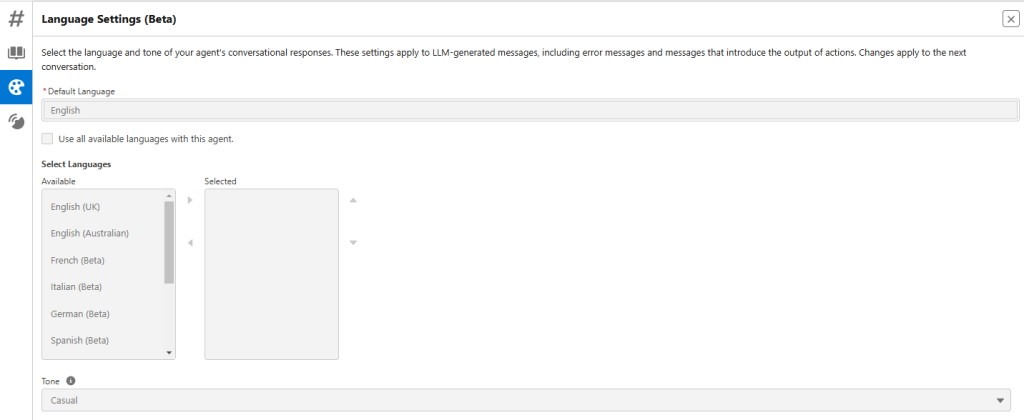
Feature Details:
- Supports 7 languages: English, French, German, Italian, Japanese, Portuguese, and Spanish
- Available in multiple locales for each language
- Configurable through Agent Builder’s Language Settings tab
Link: Help And Training Community
Plative Perspective: This feature represents a significant step in making Salesforce’s AI tools more globally accessible and user-friendly, potentially increasing adoption and user satisfaction across international markets.
Risks and Considerations:
- Beta service is subject to pilot terms and conditions
- Language responses may not be exact matches for specific locales
- Requires Einstein for Sales, Service, or Platform add-on
Build, Test, and Troubleshoot Agents More Easily with Agent Versions
Overview: Salesforce now enables users to create multiple versions of AI agents, allowing for easier iteration, testing, and troubleshooting with minimal operational disruption.
Feature Details:
- Create up to 20 versions of a single agent
- Test changes without removing active production agents
- Save versions as backups for quick restoration
- Switch between agent versions in Agent Builder and the Details page
Link: Help And Training Community
Plative Perspective: This feature provides significant flexibility for AI agent development, allowing consultants and clients to experiment and refine AI solutions with reduced risk and improved change management.
Risks and Considerations:
- Only one active version allowed for Agentforce (Default)
- Potential complexity in managing multiple agent versions
- This change is available starting in early February 2025
Say Hello to Agent for Setup, Your Sidekick for Admin Tasks
Overview: An AI-powered assistant designed specifically for Salesforce administrators to help streamline setup tasks and improve productivity.
Feature Details:
- Helps administrators troubleshoot user access issues
- Assists in creating report types
- Provides answers from Salesforce Help documentation
- Customizable through Agent Builder with topics, actions, and system messages
Link: Help And Training Community
Plative Perspective: This feature significantly advances administrative efficiency by leveraging AI to support complex setup tasks, potentially reducing time spent on routine administrative work.
Actions available include things like getting an object or field and describing OAuth connector configuration.
Risks and Considerations:
- Requires Agentforce to be enabled in the org
Add AI-Powered Quick Actions to Record Pages
Feature Details: AI-powered Quick Actions allow users to create quick actions in Salesforce that leverage AI capabilities. These actions can be added to record pages, enabling users to perform tasks more efficiently.
Link: Help And Training Community
Plative Perspective: This feature enhances user experience by integrating AI into everyday tasks, making it easier for users to access powerful functionalities without manually typing commands. For example, you could summarize a contact.
Risks and Considerations:
- The feature is not included in the initial Spring ’25 release, so availability may be delayed.
- Users may require training to effectively utilize AI-powered quick actions.
- There may be limitations on the types of actions that can be created or the complexity of utterances supported.
Service Agent
Monitor Real-time Conversations Between Agentforce Service Agents and Customers
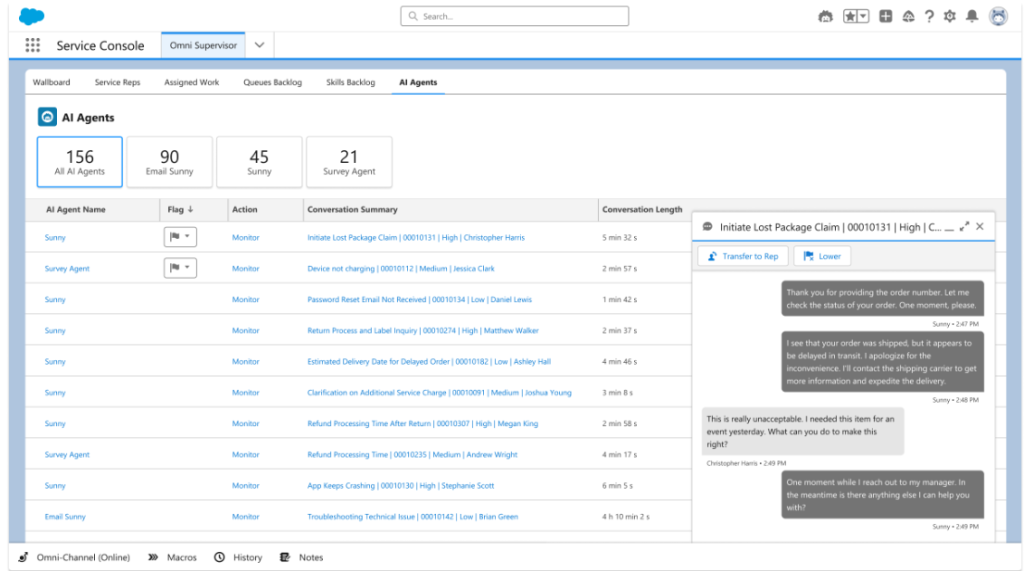
Overview: Supervisors can now monitor live messaging sessions between AI agents and customers, improving service quality and support.
Feature Details:
- Monitor enhanced Messaging and Messaging for In-App and Web sessions
- Use Omni Supervisor to track conversations
- Add Raise Flag action to AI agents
- Supervisors can lower flags and transfer conversations to human representatives
Link: Help And Training Community
Plative Perspective: This feature enhances real-time supervision and support for AI-driven customer service interactions, allowing immediate human intervention.
Risks and Considerations:
- Needs Einstein for Service, Einstein Platform, or Agentforce Service Agent add-on
- Requires configuration of AI agents with Raise Flag action
- Supervisor configuration may need to be adjusted to show AI Agents tab
Flag Supervisors to Help with Agentforce Service Agent Conversations
Overview: A new feature that allows AI service agents to flag conversations that require supervisor intervention during simultaneous customer interactions.
Feature Details:
- Enables supervisors to focus on critical conversations
- Uses a “Raise Flag” action to alert supervisors
- Applicable in scenarios like customer distress or refund requests
- Works within Omni Supervisor interface
Link: Help And Training Community
Plative Perspective: This feature enhances real-time support management by providing a streamlined way for AI agents to escalate complex or sensitive conversations.
Risks and Considerations:
- Requires modification of AI agent topic instructions
- Only available in specific Salesforce editions with service agent add-ons
- Depends on the supervisor’s ability to quickly respond to flagged conversations
- Potential for over-flagging if not carefully configured
- Requires training for both AI agents and supervisors on effective use
Sales Agent Updates
Coach Sales Reps at Scale with Agentforce Sales Coach
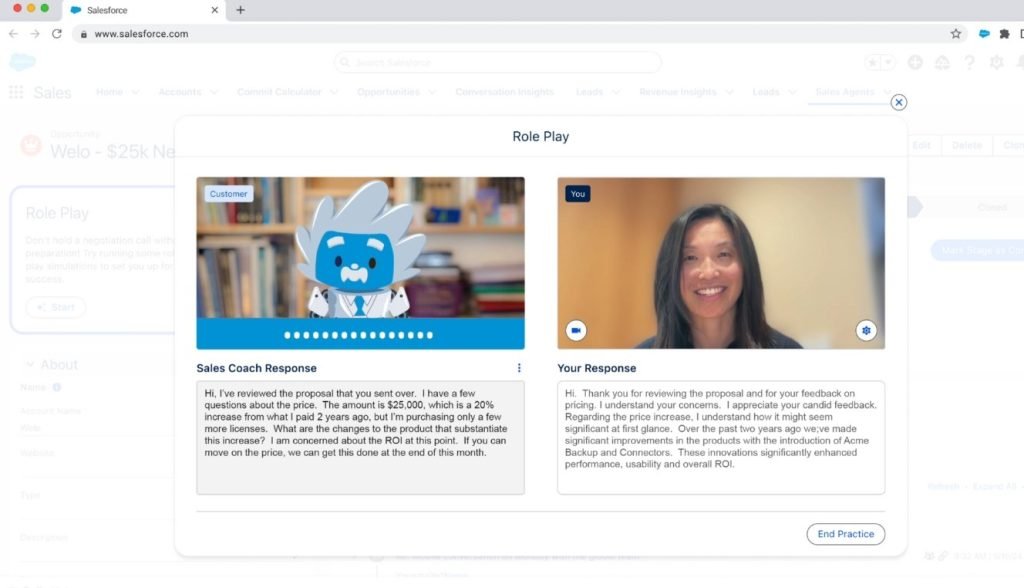
Overview: Agentforce Sales Coach is an AI-powered tool designed to provide personalized coaching for sales representatives, helping them improve their sales performance through AI-driven analysis and feedback.
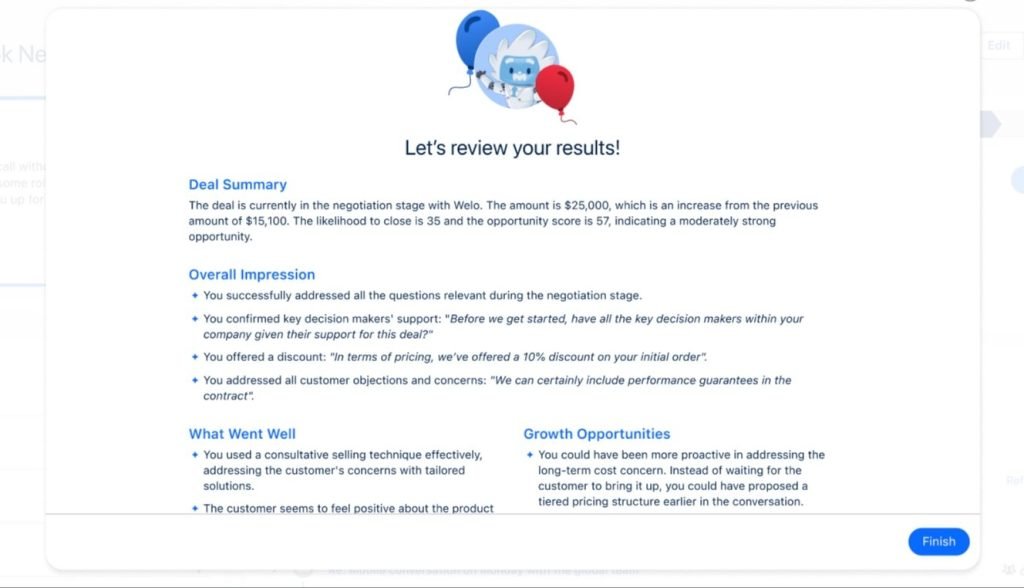
Feature Details
- Analyzes sales pitches and role-play sessions across different opportunity stages
- Provides tailored feedback using AI and CRM data
- Available on Opportunity pages via a new Lightning page component
- Supports coaching in Qualification, Needs Analysis, Proposal/Pricing, and Negotiation stages
- Includes new Agent topics for opportunity coaching and role-play scenarios
Link: Help And Training Community
Plative Perspective: This tool significantly advances AI-assisted sales coaching, offering scalable, personalized guidance to improve sales team performance.
Risks and Considerations:
- Requires Enterprise, Performance, or Unlimited editions with Agentforce Sales Coach add-on
- Dependent on the quality of AI analysis and underlying CRM data
- May require additional training for sales representatives to fully utilize the tool
Enhance Agentforce Sales Coach Responses with a Data Library
Overview: A new feature that allows Agentforce Sales Coach to access a curated collection of files and knowledge articles to generate more personalized and reliable responses.
Feature Details:
- Provides access to trusted data sources
- Enhances AI-generated coaching responses
- Configurable through Agent Builder setup
- Improves contextual understanding during role-play sessions
Link: Help And Training Community
Plative Perspective: The Data Library feature adds a layer of credibility and context to AI-generated coaching, potentially increasing the value and accuracy of sales coaching interactions.
Risks and Considerations:
- Requires careful curation of data library content
- Potential information overload, if not properly managed
- Depends on the quality and relevance of included knowledge resources
Marketing
Streamlining Campaign Creation with AI
Overview: The latest AI enhancements in Salesforce allow users to generate campaign content effortlessly, making it easier to create effective marketing materials.
Feature Details:
The Agentforce (Default) agent assists in generating content for emails and landing pages, while the campaign brief prompt in Prompt Builder helps define key campaign elements quickly.
Link: Help And Training Community
Plative Perspective: These new features can significantly enhance productivity and creativity in campaign development, allowing teams to focus on strategy rather than content creation.
Risks and Considerations:
- Ensure that generated content aligns with brand voice and messaging.
- Review AI-generated content for accuracy and relevance.
- Be aware of potential over-reliance on AI, which may stifle creativity.
Conversation Insights
Identify Coachable Moments from Recorded Video Calls
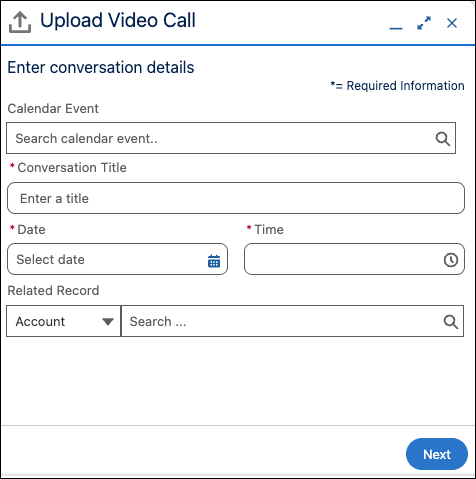
Overview: For organizations using Conversation Insights, this feature enables sales teams to upload and analyze video call recordings to identify coaching opportunities.
Feature Details:
- Upload video call recordings in MP4 format
- File size limit: Under 2 GB
- Maximum 3 video uploads per user per day
- Supports Zoom, Microsoft Teams, and Google Meet platforms
- Identifies key coachable moments from recordings
Plative Perspective: Provides a structured approach to sales team skill development and performance improvement.
Risks and Considerations:
- Requires specific video file format (MP4)
- Limited to 3 uploads per day
- Available only in Hyperforce orgs
Use Generative AI in All Supported Languages
Overview: Einstein Conversation Insights now supports generative AI features across 37 languages.
Feature Details:
- Supports Call Summaries, Call Explorer, Generative Conversation Insights
- 37 languages supported, including multiple English variants, Spanish (Spain, US), French (Canada, France), Chinese (Simplified, Traditional) and Arabic, Korean, Japanese, and more
Link: Help And Training Community
Plative Perspective: Enables global sales teams to leverage AI-powered insights across diverse linguistic environments.
Risks and Considerations:
- Sales Signals only available in English
- Potential variations in AI accuracy across languages
Use Call Explorer in Flows
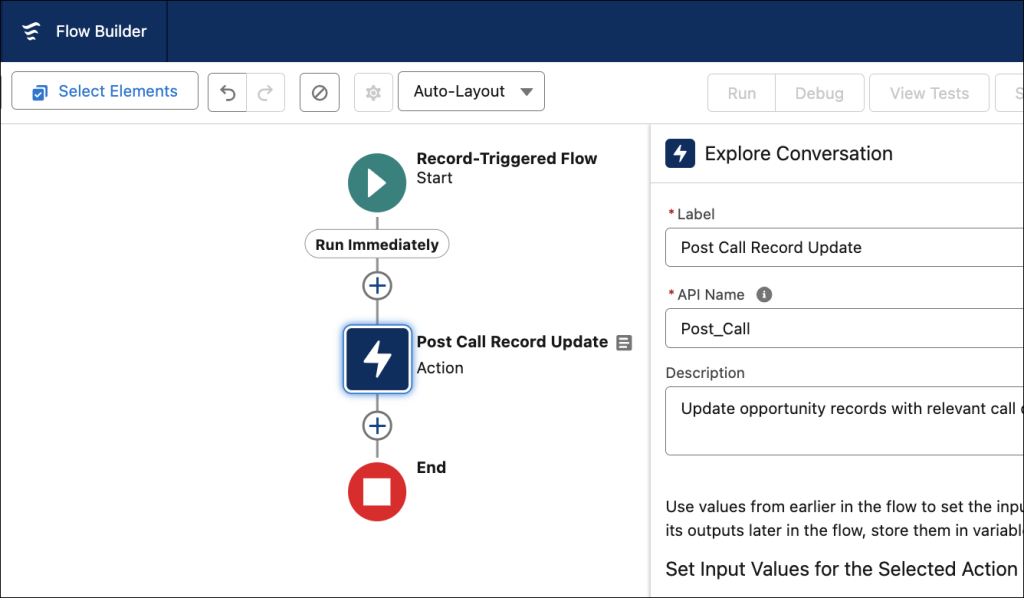
Overview: Integrate Call Explorer insights directly into Salesforce Flows for automated record updates and insights capture.
Feature Details:
- Explore Conversation available as a standard action in Flow Builder
- Supports all flow types (screen flows, scheduled flows, record-triggered flows)
- Automates record updates based on call insights
- Enables sales teams to focus on selling
Link: Help And Training Community
Plative Perspective: Streamlines sales processes by automatically capturing and acting on call insights.
Risks and Considerations:
- Requires Salesforce admin configuration
- Depends on proper flow design
- Needs access to Einstein Conversation Insights
- Requires Einstein for Sales features
Customization
List Views
Sort List Views by Multiple Columns (Generally Available)
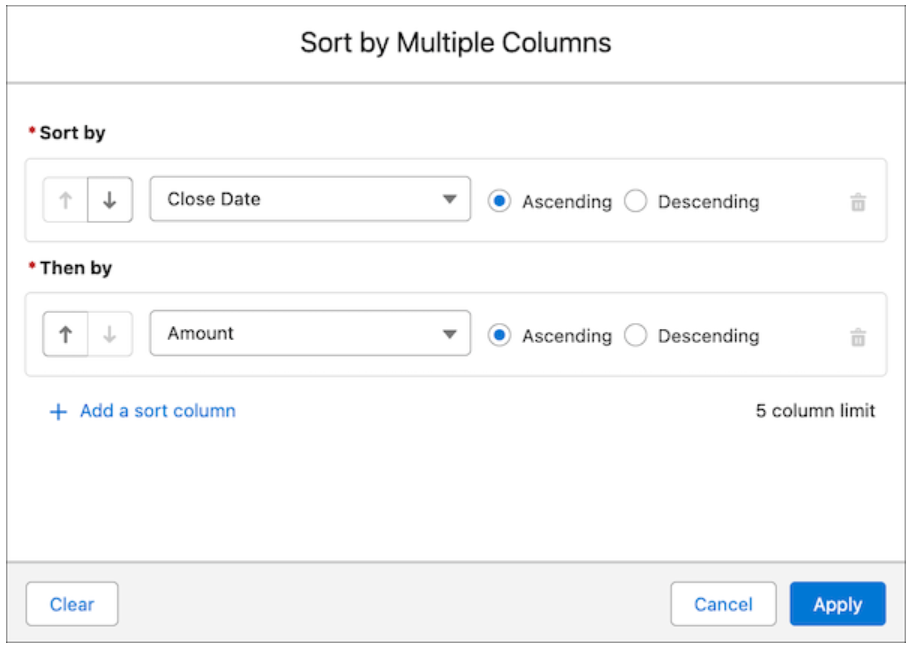
Overview: To see your data more intuitively and make your list views more actionable, you can now sort list views on object home pages by up to five columns.
Feature Details:
- Select the columns to sort by and whether to sort each column in ascending or descending order.
- Sorting by multiple columns affects only your user preferences, and you can’t save your multi-column sorting configuration as a default.
Plative Perspective: This feature enhances user experience by allowing more flexibility in data organization, making it easier to analyze and act on information.
Risks and Considerations:
- Sorting large datasets could potentially impact performance.
- The multi-column sort configuration is not saved as a default, which may confuse users.
Permissions and Sharing
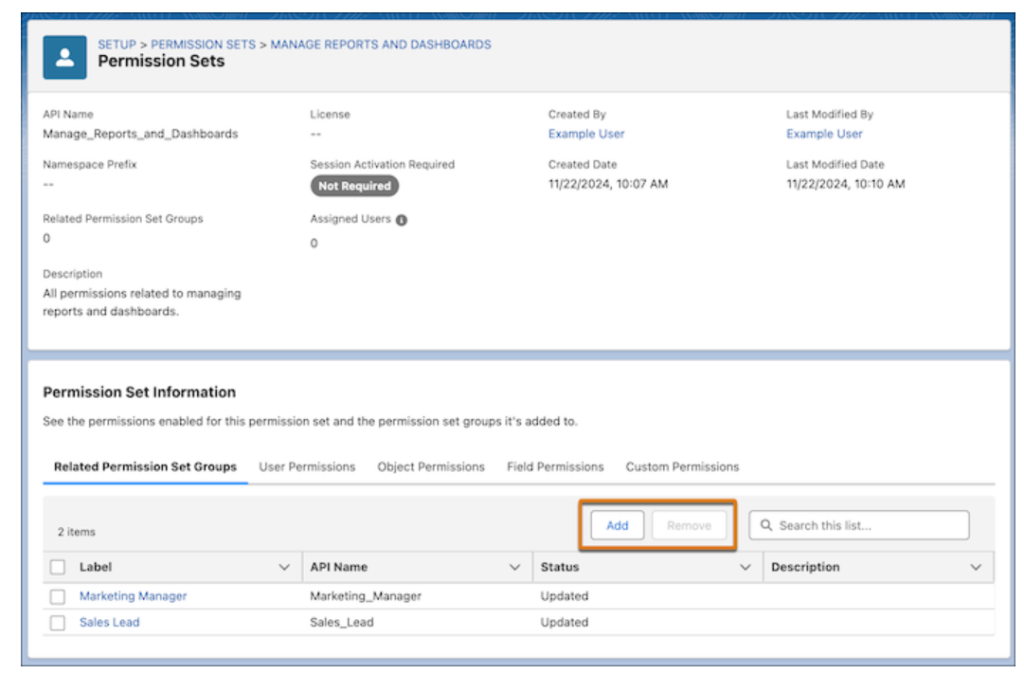
- Role and Permission Set Management: Permission set groups can now be managed via summaries, making it easier to specify which permission set groups include permission set directly from the permission set’s summary. User and custom permissions can also be removed in permission set summaries.
- View All/Modify All Renaming: The View All/Modify All object permission has been renamed to View All Records and Modify All Records and introduces the View All Fields object permission.
- Public Group Management: You can now easily view sharing rules and list views for all objects associated with a public group in Salesforce, as well as see all queues within that group without needing to select a specific object.
- Sharing Rule Alerts: Receive an alert when a sharing rule triggers record access to external users.
Links:
- Help And Training Community
- Help And Training Community
- Help And Training Community
- Help And Training Community
Plative Perspective: These updates significantly streamline permission and sharing management, provide more transparent and granular access control, and enable faster, more precise permission configuration
Risks and Considerations:
- Recommend thorough testing when implementing new permission configurations
- Ensure proper governance and regular access reviews
Password Reset Link Stays Valid After Multiple Clicks
Overview: Salesforce has improved the password reset process by allowing users to click the reset link multiple times within a 24-hour period. This change addresses issues where links became invalidated if not completed or were scanned by email security tools.
Feature Details:
- New setting on the Identity Verification page in Setup, enabled by default
- Users confirm their intent to reset their password after clicking the link before proceeding
Plative Perspective: This enhancement simplifies the user experience and reduces the number of support requests related to password resets. As consultants, we can guide clients in leveraging this feature to improve user satisfaction and streamline their support processes.
Risk and Considerations:
- Ensure that clients are aware of the new confirmation step to avoid confusion among users
- Monitor for any potential security implications of extended link validity
- Advise clients to communicate this change to their users to minimize support inquiries during the transition
Flow
Screen Flow Updates
Overview: Salesforce introduces enhanced screen flow capabilities to create more dynamic, responsive, and user-friendly flow experiences.
Feature Details:
- Automatically Triggered Screen Actions (Beta): Run auto launched flows in the background when input values change, eliminating manual button clicks and displaying real-time outputs.
- Real-Time Component Validation: Provide immediate, dynamic feedback on input errors as users interact with screen components.
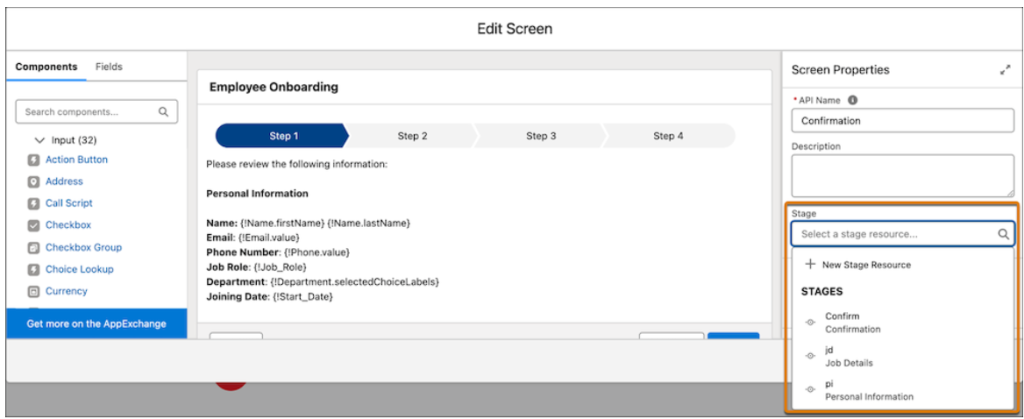
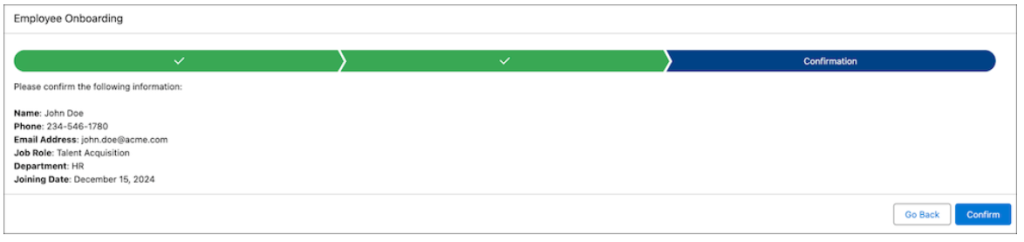
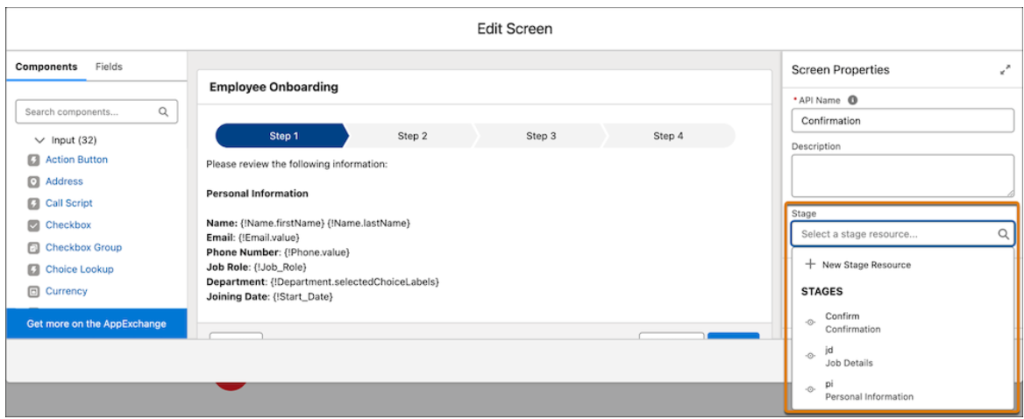
- Visual Progress Indicators: Implement built-in, configurable stage tracking to guide users through complex screen flows with minimal custom coding.
- Efficient Stage Assignment: Simplify flow design by directly managing stages within screen properties with automatic variable updates.
Link: Help And Training Community
Plative Perspective: These updates significantly enhance flow design capabilities, creating more intuitive, responsive, and user-friendly screen flows that provide immediate feedback and guidance.
Risks and Considerations:
- Beta feature, subject to potential changes
- Potential complexity in implementation
- May need redesigning of existing flows
User Experience Updates
Overview: This section outlines improvements to the Flow Builder user experience, focusing on making it easier to find, manage, and troubleshoot flows. It includes enhancements to searching and filtering, version management, error handling, and resource creation.
Feature Details:
- Find and manage different versions of a flow from within Flow Builder: Flow Builder now provides a way to quickly manage different versions of a flow and see the status of each version. Users can click the flow’s name in the navigation header to view the versions and open different versions in new browser tabs.
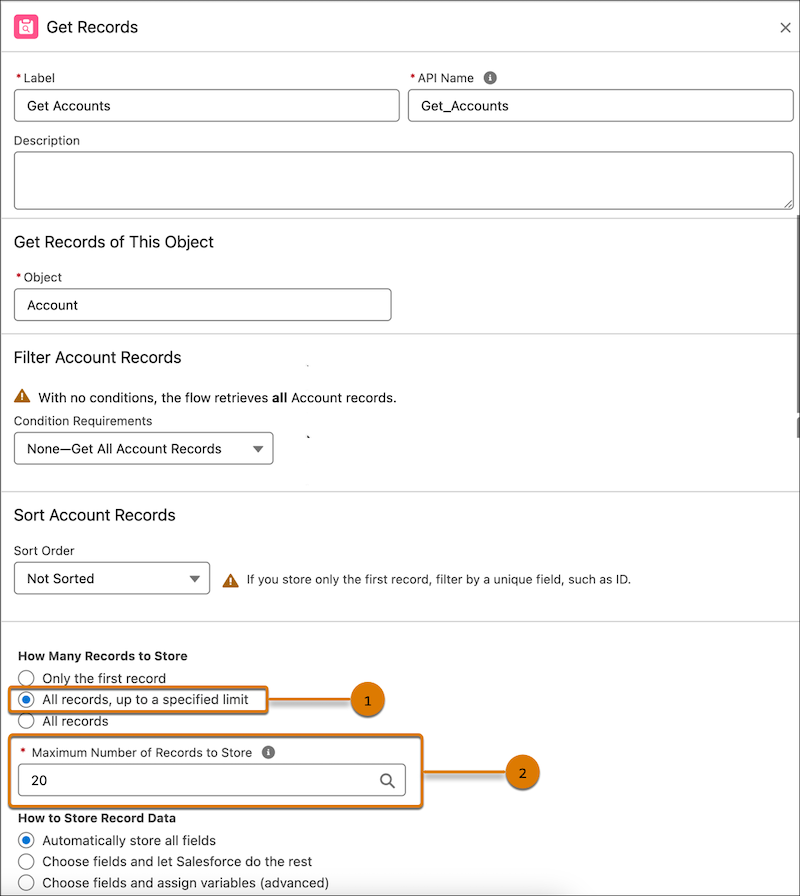
- Limit Number of Records Retrieved in Get Records Element: You can enhance flow performance in Salesforce by setting an upper limit on the number of records retrieved with the Get Records element, which helps avoid performance issues and governor limits when working with large datasets.
- Undo, redo, and save as with keyboard shortcuts: New keyboard shortcuts are added for undo, redo, and save as actions, making flow building more efficient.

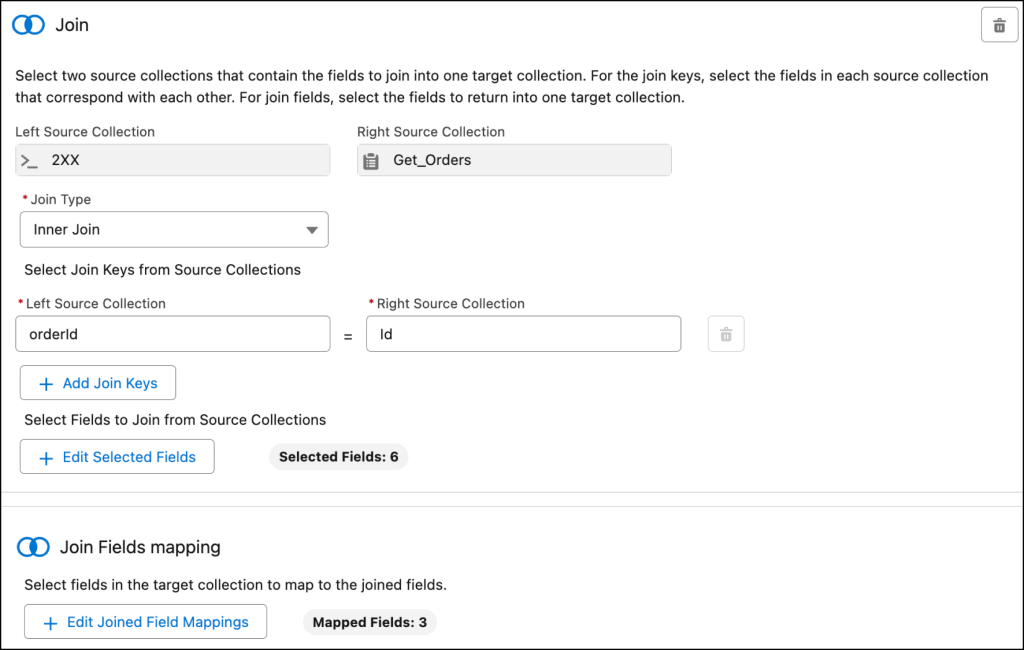
- Join Collections with the Transform Element: You can combine source collections from related flow resources into a single target collection using the Transform element in Flow Builder, allowing for a unified data structure to be displayed in a flow screen.
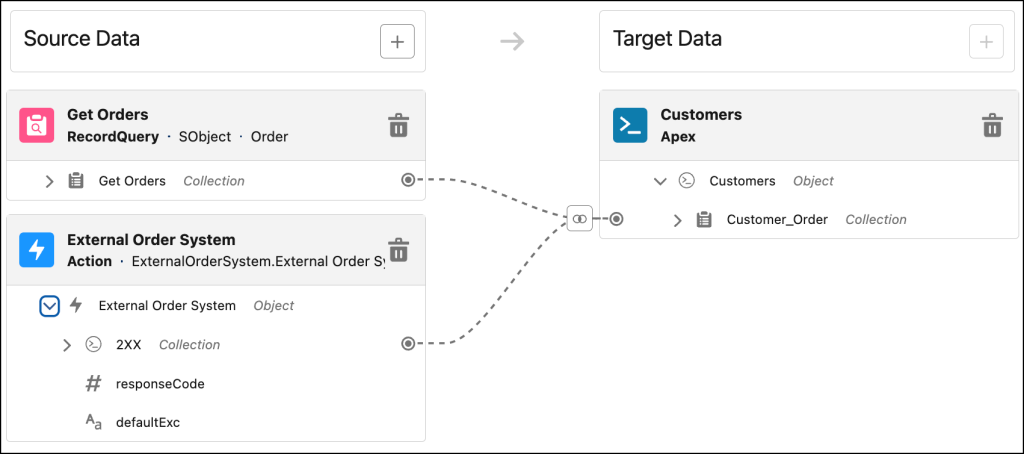
Configure the join keys for each source collection and select the join fields to return to the target collection.
- Send Emails with Attachments in Flow Builder: Enhance emails in Flow Builder by attaching documents or files using the Send Email action, with a maximum email size of 35 MB, by providing the attachment ID during setup.
Links:
- Help And Training Community
- Help And Training Community
- Help And Training Community
- Help And Training Community
- Help And Training Community
Plative Perspective: The enhancements to Flow Builder significantly improve user experience by streamlining flow management, enhancing performance, and increasing efficiency through new features like version management and keyboard shortcuts. These updates empower users to create and manage flows more effectively, ultimately leading to better automation and productivity within Salesforce.
Risks and Considerations:
- Users should be cautious when setting limits on the number of records retrieved in the Get Records element, as overly restrictive limits may lead to incomplete data processing.
- When using the Send Email action with attachments, ensure that the total email size does not exceed 35 MB to avoid delivery issues.
- It is important to regularly review and manage flow versions to prevent confusion and ensure that the most relevant version is in use.
- Users should familiarize themselves with the new keyboard shortcuts to maximize efficiency and avoid potential errors during flow building.
Flow Approval Processes
Feature Details:
Assign approval steps to groups or queues instead of specific individuals, enabling more flexible approval workflows in Salesforce.
Key Capabilities:
- Queue or public group members and their delegates receive an email when an approved work item is created
- The first person to act on the work item (approve/reject) completes the step
- Subsequent attempts to act on the work item result in an error
- Once the first person approves/rejects, the work item is no longer visible to others
Links: Help And Training Community
Plative Perspective:
This feature enhances workflow flexibility by:
- Distributing approval responsibilities across teams
- Reducing dependency on specific individuals
- Enabling faster approval processes
- Supporting more dynamic organizational structures
Risks and Considerations:
- Potential confusion if multiple team members attempt to act on the same work item
- Need for clear team communication about who will handle the approval
- Requires careful group and queue management
- Standard Approval Process migration will require strategic planning
Dev Updates
Local Dev Server for Lightning Experience Desktop and Mobile
Overview: Developers can now use Local Dev for Lightning apps to see real-time previews of their Lightning web components without deploying code or refreshing the browser.
Feature Details: The Lightning Web Components (LWC) Local Development Server is a Salesforce CLI plug-in that configures and runs a Lightning Web Components-enabled server on your computer. You can develop Lightning web components and see live changes without publishing the components to an org.
Lightning Dev Server allows you to serve the JS code from your local source files and inject them into Salesforce’s DOM. Using a web socket connection, as files are updated in your project, the new code will be automatically injected into the DOM, giving you instant access to changes.
Link: Salesforce Developers
Plative Perspective: This feature streamlines the development of Lightning Web Components, making it faster and more efficient.
Risks and Considerations:
- This feature is still Beta
- This plugin does not support these features:
@AuraEnabledApex methodsCSScustom propertiesLightningModallwc:if,lwc:elseif, andlwc:elsedirectives- multiple directories and
sfdxmultiple packages
Introducing Salesforce Lightning Design System (SLDS) 2 (Beta)
Overview: Use SLDS 2 to build scalable and flexible user interfaces with themes that adapt to future changes, ensuring your code remains efficient and modern.
Feature Details: The new design of SLDS 2 is achieved through CSS updates and the implementation of styling hooks without changing the markup or structure of components. This approach allows for seamless UI changes while preserving the Lightning Experience
As a developer, transition your org to SLDS 2 using SLDS Validator to audit your code. SLDS Validator analyzes your code, validates it against SLDS 2 guidelines, and identifies custom components that need updates. SLDS Validator also provides automated fixes and suggests improvements to ensure compliance with SLDS 2 standards.
Link: Help And Training Community
Plative Perspective: Starting to use Salesforce Lightning Design System (SLDS) 2 is important to keep custom components aligned with Salesforce’s provided UI and its updates.
Risks and Considerations:
- This feature is still Beta.
- By default, SLDS 2 is enabled in new and existing Starter and Pro Suite organizations.
- It’s enabled in new Sales organizations across all editions and select new Service organizations.
Retirement: API Versions 21.0 Through 30.0
Overview: Salesforce Platform API versions 21.0 through 30.0 are being retired.
Feature Details: The retirement was initially scheduled for Summer ‘23 but was postponed to Summer ‘25. While these API versions can still be used currently, they are not supported and will no longer be available after Summer ‘25. Applications that continue to use these legacy versions after the retirement date will be disrupted and experience failures.
Link: Help And Training Community
Plative Perspective: This process is important to ensure that customer metadata remains valid for Salesforce support, continues to receive future updates, avoids errors, and maintains the overall health of the org.
Action item: Developers should check if there are any Apex classes, Apex triggers, or Visualforce pages using API versions between 21.0 and 30.0. If found, they must update the versions to ensure these classes remain supported and to avoid errors caused by the lack of updates.
Risks and Considerations:
- This change affects all REST APIs that use URIs beneath
/services/data/vXX.X/. See the full list of APIs affected.
Financial Services Cloud
Data Cloud for FSC
Overview: Salesforce introduces enhanced Contextual Alerts for Financial Services Cloud, enabling financial advisors to proactively manage client financial goals through data-driven insights and actionable recommendations.
Feature Details: The new feature leverages Data Cloud and Financial Services Cloud to provide holistic views of client financial health, generating timely alerts about milestones, off-track goals, and allocation changes. Advisors can create and review’s ability to create detailed, integrated financial management solutions.
Link: Help And Training Community
Plative Perspective: With Contextual Alerts, an advisor can proactively reach out to clients they realize an account is off track, demonstrating high-touch, data-driven advisory services that go beyond traditional reactive financial planning. Example: an account is 15% behind schedule on saving for retirement. Contextual Alerts would not just send an alert, but could also suggest specific actions like:
- Schedule a portfolio review meeting
- Recommend increasing monthly contributions
- Suggest adjusting investment mix to align with her risk tolerance and timeline
Risks and Considerations:
- Requires enabling Financial Account Management Standard Objects setting
- Potential complex data migration for existing implementations
- May require significant system and process redesign
- Increased complexity in data management and reporting
Nonprofit Cloud
Fundraising
Overview: Nonprofit Cloud for Fundraising introduces several powerful enhancements to streamline fundraising efforts, including automated source code generation, improved donor tracking, and advanced data management capabilities.
Feature Details:
- Object and field updates
- Auto-generated outreach source codes for large-scale campaigns
- Soft credit rollups to track donor influence
- Automated roll-up calculation updates
- Customizable summary displays and donor segmentation
- Bulk pledge management through Business Process API
- Advanced RFM scoring customization
- Enhanced prospect research and generational insights
Links: Help And Training Community
Plative Perspective: Plative clients can leverage these features to create more targeted, efficient fundraising strategies, improve donor relationship tracking, and gain deeper insights into donor behaviors and potential.
Risks and Considerations:
- Requires specific permission sets
- May require staff training to fully utilize new features
- Integration with existing systems and data migration should be carefully planned
- Potential data privacy and compliance considerations when tracking detailed donor information
Program and Case Management
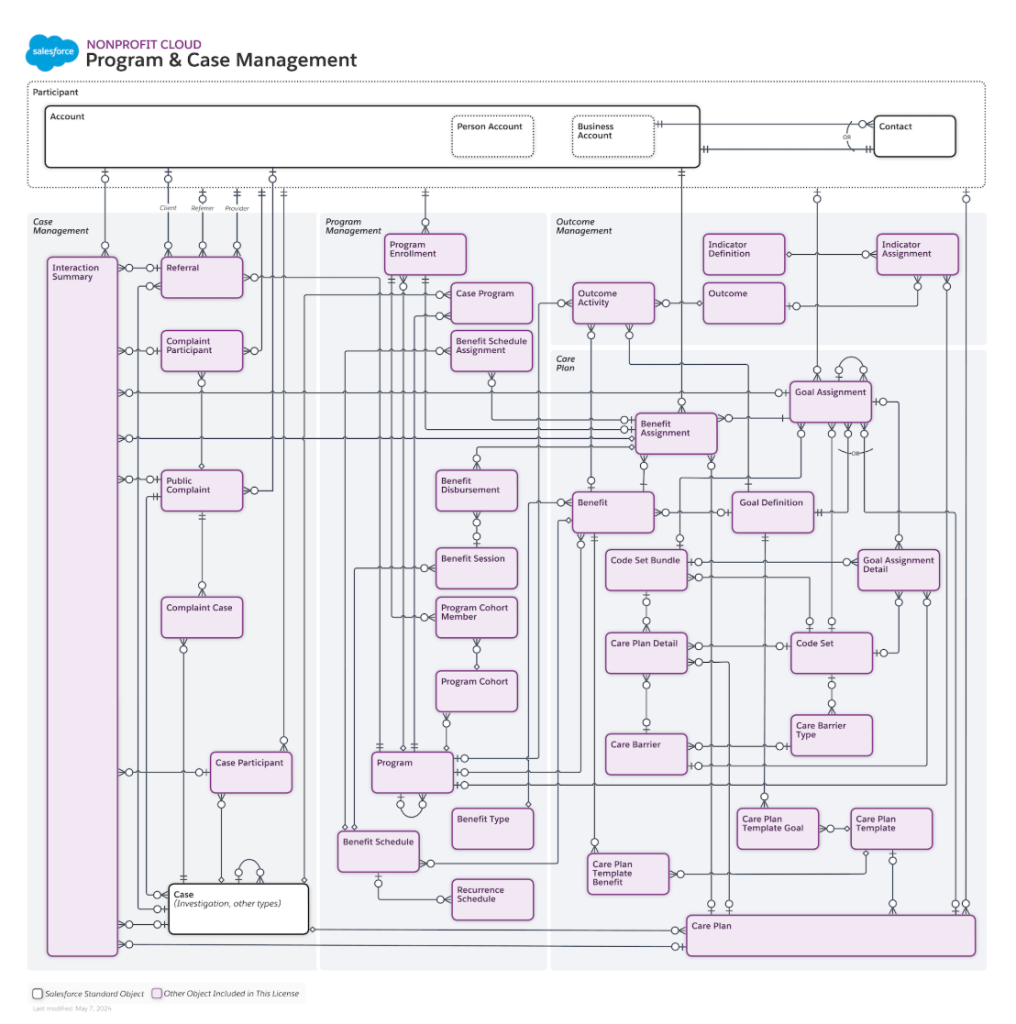
Overview: Salesforce has enhanced Program and Case Management by introducing custom Care Plan Goals and improved template management, allowing organizations to create more personalized and meaningful client care experiences.
Feature Details: Users can now create custom, client-specific goals within care plans, enabling more tailored and engaging care strategies. Additionally, organizations can clone existing care plan templates to improve quality, consistency, and compliance, with new stage management capabilities to automate processes and reduce errors.
Updated Program and Case Management ERD
Links: Help And Training Community
Plative Perspective: For clients in healthcare, social services, and nonprofit sectors, these enhancements provide more flexibility in designing individualized care plans, allowing for more precise tracking of client progress and more efficient program management.
Risks and Considerations:
- Ensure proper training for staff on the new care plan goal-creation process
- Review and update existing care plan templates to leverage new cloning and stage management features
- Verify user permissions and page layout configurations to fully utilize new object fields
- Consider potential workflow changes required to implement more granular care plan tracking
Sales Cloud
Custom Fields and Integrations
Take Advantage of the Increased Custom Field Limit for Activities
Overview: Salesforce has increased the custom field limit for the Activities object, providing more flexibility for tracking and customizing activity records.
Feature Details
- The custom field limit increased from 100 to 300
Link: Help And Training Community
Plative Perspective: The expanded custom field limit allows organizations to capture more detailed information about activities, enabling more comprehensive tracking and reporting.
Risks and Considerations:
- Limited to orgs with fewer than 400 million activities
Data and Prospecting
Find Your Next Customer with Prospecting Center, a New Data Cloud App
Overview: Salesforce introduces Prospecting Center, a new Data Cloud app designed to help sales teams identify and prioritize the most promising accounts using advanced scoring and segmentation.
Feature Details
- Identifies most promising accounts using buyer signals
- Calculates comprehensive scoring:
- Fit Score, Engagement Score, Intent Score
- Provides Unified Prospecting Center view for Sales Reps
- Enables creation of custom account scoring rules
- Allows filtering prospects using segments
- Supports integration with third-party data connectors: Zoominfo and Demandbase
Link: Help And Training Community
Plative Perspective: This feature empowers sales teams to work smarter by leveraging AI-driven insights, helping reps focus on the most promising prospects and potentially accelerating sales cycles.
Risks and Considerations:
- Requires additional configuration and setup alongside Data Cloud at additional cost
- Dependent on the quality of underlying data sources
- The potential learning curve for sales teams adapting to the new scoring methodology
Email Integration Changes
Salesforce for Outlook Is Being Retired in December 2027
Overview: Salesforce is transitioning from Salesforce for Outlook to Outlook integration and Einstein Activity Capture, marking a significant change in email and calendar synchronization.
Feature Details:
- Salesforce for Outlook being retired
- Outlook integration and Einstein Activity Capture will replace existing features
- Sync capabilities will change:
- No more automatic syncing of contacts, events or tasks
Link: Help And Training Community
Plative Perspective:
This transition represents a strategic shift in Salesforce’s approach to email and calendar integration.
Risks and Considerations:
- Potential disruption to existing email and calendar sync workflows
- Additional costs associated with replacement features
- Potential temporary loss of sync functionality during the transition
Maintain Access to the Outlook Integration
Overview: Microsoft is deprecating legacy features that impact Salesforce Outlook integration, requiring administrators to take proactive steps to maintain functionality
Feature Details:
- Specifically impacts Exchange Online
- In Setup, go to the Outlook Integration and Sync section. Use the Admin Consent Flow to make these changes and authorize the add-in for all users
- Otherwise, individual users must manually authorize the integration after Microsoft rolls out the change
Link: Help And Training Community
Plative Perspective: This update requires careful management to ensure continued seamless integration between Salesforce and Microsoft Outlook, potentially impacting organizational productivity.
Risks and Considerations:
- Requires immediate administrative action
- Potential disruption to existing email integration
- Needs coordination between Salesforce and Microsoft 365 administrators
- Potential temporary loss of integration functionality
Upgrade Your Service Account Connections from Org-Level OAuth 2.0 Authentication
Overview: Salesforce is retiring service account OAuth 2.0 access to Microsoft Office 365 for Einstein Activity Capture, requiring organizations to update their authentication approach.
Feature Details:
- Retirement of existing service account OAuth 2.0 access
- Requires migration to the new authentication method
- Provides flexibility in user authentication scoping
- Supports Microsoft Exchange Role-Based Access Control
Link: Help And Training Community
Plative Perspective: This authentication update ensures more secure and granular access management for Microsoft Office 365 integrations, potentially improving overall system security and compliance.
Risks and Considerations:
- Requires immediate action to maintain Einstein Activity Capture functionality
- Potential disruption to existing service account connections
Increase Efficiency by Using the Gmail Integration in the Chrome Side Panel
Overview: Salesforce introduces an enhanced Gmail integration in the Chrome side panel, providing a more seamless and persistent user experience across browser interactions.
Feature Details:
- Gmail integration now available in the Chrome side panel
- Maintains email functionality while working on other features
- Reduces logout frequency by preserving user session
- The side panel remains visible across browser tabs and different pages
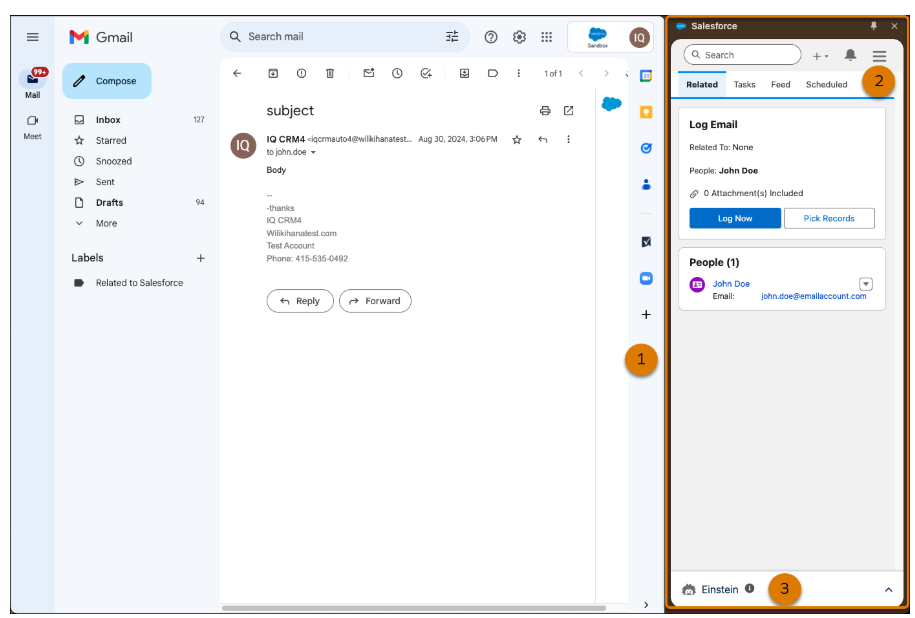
Updated Gmail integration available in side panel
Plative Perspective: This integration enhances user productivity by creating a more fluid and uninterrupted workflow between Salesforce and Gmail, reducing context switching and improving overall efficiency.
Risks and Considerations:
- Requires compatible browser (Chrome)
- Option to revert to the original format
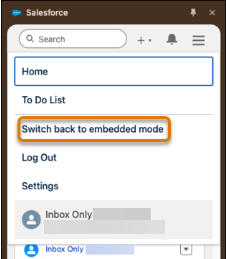
Setting update
Service Cloud Updates
Create Advanced Approval Processes for Knowledge Articles
Overview: Salesforce enhances knowledge base management by introducing more sophisticated, multi-stage approval processes using Flow Builder and orchestrations.
Feature Details:
- Design complex, multi-stage approval processes for knowledge base
- Utilize Flow Builder and orchestrations to create tailored approval workflows
- Key implementation capabilities:
- Include decision elements to manage flow based on specific outcomes
- Define detailed requirements for each stage and step
- Trigger steps based on relevant record changes
- Assign interactive steps to Users, Groups and Queues
Link: Help And Training Community
Plative Perspective: This feature gives organizations greater flexibility and control in managing knowledge base approval processes, enabling more nuanced and business-specific workflows.
Risks and Considerations:
- Requires advanced understanding of Flow Builder
- Complexity increases with multi-stage processes
- Needs careful design to ensure efficient approval routing
Experience Cloud
Aura and LWR Sites
Upgrade to Enhanced LWR Sites (Generally Available) (Release Update)
Feature Details:
Upgrade existing LWR sites to enhanced LWR sites, providing access to advanced features like expression-based visibility, custom CSS controls, site content search, Data Cloud integration, and enhanced CMS workspaces.
Link: Help And Training Community
Plative Perspective: This upgrade represents a significant opportunity for clients to modernize their Experience Cloud sites, leveraging more sophisticated customization and integration capabilities. The enhanced platform offers greater flexibility in content management and user experience design.
Risks and Considerations:
- Metadata changes may require careful testing and potential adjustments to existing site configurations
- Upgrade process requires removing /s from site URLs if present
- Compatibility check required for existing custom components and integrations
- Mandatory upgrade enforcement in Spring ’26 means proactive planning is essential
Components in Experience Builder
Biometric Login Available for Experience Cloud
Feature Details:
Introduce a Biometric Login Button component for Mobile Publisher apps, enabling users to log in to Experience Cloud mobile apps using face or fingerprint recognition with one tap.
Link: Help And Training Community
Plative Perspective: This feature enhances user experience and security by providing a convenient, modern authentication method for mobile app users. It simplifies the login process while leveraging device-level biometric authentication technologies.
Risks and Considerations:
- Requires at least one active community license in the organization
- Only supported on Experience Cloud apps configured with User Opt-In Biometric Login
- Compatible with both Aura and LWR sites
- Potential privacy and security concerns around biometric data storage and usage
Increase the Security of Your Site with the Manage External Users Permission
Overview: You can now assign the Manage External Users (Limited) permission – instead of the Manager External Users permission – for greater security when you grant users the ability to manage external users.
Feature Details: Users with the Manage External Users (Limited) permission can manage only external users that they have read and write access to. The Manage External Users permission allows them to manage all external users.
Link: Help And Training Community
Plative Perspective: The new permission is a valuable asset, allowing for more granular permission control when managing external users.
Risks and Considerations:
- Review and update existing user permissions and determine which users should/can be assigned the new limited permission.
Marketing Cloud Account Engagement
Get more visibility into Email Send Issues
Overview: Account Engagement has enhanced email reporting capabilities, providing more detailed insights into email send failures and configuration issues. The update improves visibility into why emails might not be successfully delivered.
Feature Details:
The new reporting feature includes expanded reasons for email send failures, such as invalid or banned email addresses. Configuration issues are now displayed in the Account Engagement Optimizer, with a direct link to a comprehensive Failed Email Sends table containing detailed prospect information.
Links:
Plative Perspective: This enhancement provides our clients with deeper diagnostic capabilities for email marketing campaigns, enabling more precise troubleshooting of communication barriers. Marketing teams can now quickly identify and address email delivery issues, improving overall campaign effectiveness.
Risks and Considerations:
- Potential increase in administrative overhead for reviewing failed email sends
- Requires active monitoring of the Failed Email Sends table
- May reveal underlying data quality issues in prospect lists
- Clients will need to develop a process for addressing email delivery failures
- Potential privacy considerations when handling detailed prospect communication data
MuleSoft Composer for Salesforce
Overview: MuleSoft Composer for Salesforce allows users to integrate data from any system with clicks and invoke processes in any flow.
Feature Details:
- MuleSoft Composer enables users to connect information from different systems to create a real-time integrated view of customer and business data.
- MuleSoft Composer for Salesforce is a separate product, and requires a separate license.
- Users should be aware of any limitations for the third-party systems that they connect to and plan accordingly.
Links: Help And Training Community
Plative Perspective: MuleSoft Composer represents a powerful, low-code solution that enables Plative clients to rapidly automate complex business processes across multiple enterprise systems with minimal technical overhead. By leveraging this tool, organizations can dramatically reduce manual data entry, improve operational efficiency, and create seamless integrations between Salesforce, NetSuite, and other critical business platforms.
Risks and Considerations:
- Data Security: Ensure robust authentication protocols and validate data mapping to prevent potential security vulnerabilities during system integrations
- Performance Limitations: Monitor flow performance, especially when handling large data volumes or complex transformation requirements
- Governance Challenges: Establish clear ownership, documentation, and change management procedures to maintain integration reliability and transparency
- Scalability Constraints: Recognize potential limitations in handling extremely complex custom integration scenarios that might require advanced programming
- Cost Management: Carefully track usage credits and evaluate the total cost of ownership compared to custom development approaches
Resources + Documentation
To help you prepare for and make the most of the Spring ’25 release, we’ve compiled a list of key resources:
Spring ’25 Release Notes: Help And Training Community
Comprehensive details on all new features, enhancements, and changes in this release.
Salesforce Release Deck: Salesforce Release Deck
A visual overview of the most impactful updates in Spring ’25.
Developer-focused Features: 6 Salesforce Spring ‘25 Updates for Developers
Highlights key updates relevant to Salesforce developers.
Flow Enhancements: 10 New Salesforce Flow Features in Spring ‘25
Detailed look at improvements to Flow, a critical tool for process automation.
Account Engagement (Pardot) Updates: 15+ Spring ‘25 Updates Salesforce Marketers Need to Know
Overview of changes specific to the marketing automation platform.
Trailhead Release Highlights: Spring ’25 Release Highlights
Trailhead module covering key updates in these core areas.
We recommend reviewing these resources to gain a comprehensive understanding of the Spring ’25 release and its potential impact on your Salesforce implementation. Pay special attention to any features or changes that align with your organization’s current use cases or future plans.